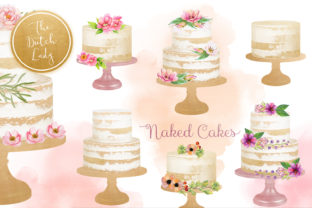
Naked Layered Wedding Cake Clipart: Elegant Design Elements
There's a quiet elegance to a naked layered wedding cake—the kind of beauty that speaks through texture, structure, and artful simplicity rather than ornate decoration. That same minimalist charm is captured perfectly in this clipart set, offering designers a versatile toolkit that feels both organic and sophisticated. Whether you're crafting a wedding invitation suite, building a bakery's brand identity, or creating content for a lifestyle blog, these hand-painted watercolor elements bring a human touch that digital perfection often misses.
What's Inside This Thoughtfully Curated Collection
This isn't just a random assortment of cake graphics. The Naked Layered Wedding Cake Clipart set from The Dutch Lady Designs includes 20 carefully crafted digital images, each designed to work together or stand alone. You'll find four empty cake images that serve as elegant bases, eight decorated cake variations that add visual interest, and four watercolor smears paired with four ink stains that function beautifully as accent elements. Every single image features a transparent background, which means no tedious cutting or masking when you drop them into your projects.
The watercolor smears and ink stains carry a slight transparency, giving them that authentic hand-painted quality. They layer naturally over other design elements without looking harsh or artificial. At a minimum of 300 dpi and with the largest dimension reaching at least 2500 pixels, these images hold up beautifully whether you're designing a small social media post or scaling up for a large-format print piece. That kind of resolution flexibility matters more than most people realize until they're staring at a pixelated graphic on a wedding banner.
Bringing Texture and Warmth to Wedding and Event Design
Wedding stationery is one of the most natural homes for this style of clipart. The naked cake aesthetic—layers visible, frosting minimal, texture celebrated—pairs beautifully with modern romantic design. Think about invitation suites where a delicate watercolor cake illustration sits alongside hand-lettered typography. Or save-the-date cards where ink stain accents frame the couple's names. These elements add warmth and personality without overwhelming the information they're meant to support.
Beyond invitations, event planners and coordinators can use these graphics across day-of materials. Table numbers, menu cards, program covers, and thank-you tags all benefit from consistent visual elements. When the same clipart style flows from the invitation through every touchpoint of an event, it creates a cohesive experience that guests notice even if they can't articulate why everything feels so polished.
Building Brand Identity for Bakeries and Creative Businesses
Small business owners in the food and wedding industries often struggle with visual branding that feels both professional and personal. Stock photography can feel generic, and commissioning custom illustrations gets expensive quickly. A well-chosen clipart set like this one bridges that gap effectively. A boutique bakery, for example, could use the decorated cake images across their logo variations, website banners, packaging stickers, and social media templates. The watercolor style communicates artisanal quality, handcrafted care, and attention to detail—all things a potential customer wants to feel about the business they're hiring.
The key to making clipart work within a brand identity is restraint and consistency. Choose two or three images from the set that best represent your aesthetic and use them repeatedly across all touchpoints. Pair them with complementary typography—perhaps a modern serif for headings and a clean sans serif for body text—and a limited color palette. This approach transforms a clipart set into a foundational design asset that anchors your entire visual presence.
Digital Content, Social Media, and Beyond
Content creators and bloggers working in the lifestyle, wedding, or food space will find endless applications for these images. A Pinterest graphic featuring a layered cake illustration can stop the scroll in a way that a plain text pin never will. Instagram story templates gain personality when watercolor smears frame quotes or announcements. Blog headers feel more intentional with a hand-painted element that ties into the post's theme.
The transparent backgrounds make these particularly useful for layering. Drop a cake image over a textured paper background, combine it with a watercolor smear for depth, and suddenly you have a custom-looking graphic that took minutes rather than hours. For those creating digital products—planners, worksheets, printable wall art—these elements add professional polish without requiring advanced illustration skills.
Practical Tips for Working with Watercolor Clipart
A few practical considerations will help you get the most from this set. First, make sure you have image editing software that supports PNG files with transparency. Programs like Adobe Photoshop, Illustrator, Affinity Photo, Canva Pro, or even free options like GIMP will handle these files well. Understanding basic layering, resizing, and color adjustment will open up far more creative possibilities.
When incorporating these elements into designs, pay attention to scale relationships. A cake illustration that looks proportionate on a business card might feel tiny on a poster. Resize thoughtfully, keeping the original resolution in mind so you never push the image beyond what it can cleanly support. The 2500-pixel minimum size gives you generous room to work, but it's still worth checking before committing to a final layout.
Color harmony is another consideration. While the original watercolor palette has its own charm, most editing software lets you adjust hue, saturation, and brightness to match your project's specific color scheme. A few subtle tweaks can make these graphics feel like they were painted specifically for your design rather than pulled from a library.
Licensing and Creative Freedom
One of the most practical aspects of this set is its licensing. Both personal and commercial use are covered, which means whether you're making wedding invitations for a friend or building product packaging for a paying client, you're protected. For designers who work across multiple projects and clients, this kind of flexible commercial licensing removes a significant barrier. You can incorporate these elements into client work, sell products featuring the graphics, and use them across your own brand without navigating complicated restrictions.
The Dutch Lady Designs, the small Netherlands-based company behind this collection, operates as a registered business with the Dutch Chamber of Commerce. That kind of transparency matters when you're investing in design assets you plan to use professionally. Knowing the source and legitimacy of your creative tools gives you confidence in the work you produce with them.
Final Thoughts on Choosing Design Assets That Work Hard
The best design assets are the ones that earn their place in your toolkit over and over again. A clipart set with strong foundational images, versatile accent elements, and professional-grade resolution will serve you across dozens of projects before you even begin to exhaust its potential. The naked layered wedding cake aesthetic occupies a sweet spot—it's specific enough to feel intentional and distinctive, yet broad enough to complement a wide range of styles from rustic to modern minimalist.
Whether you're a seasoned designer looking for fresh texture elements, a small business owner building your first brand kit, or a crafter who wants to elevate homemade invitations, having quality watercolor clipart on hand saves time and elevates results. The difference between a design that looks homemade and one that looks professionally crafted often comes down to the quality of the individual elements layered into it. Choosing assets that are high-resolution, thoughtfully designed, and properly licensed isn't just a creative decision—it's a practical one that pays dividends across every project you touch.